The section headings in Barron’s Business Law have a top border that is indented while the text of the heading is not. How did they do this?

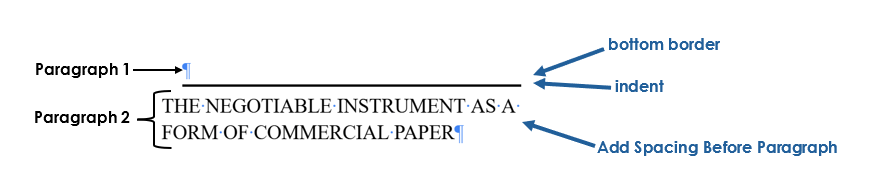
You can recreate this formatting in Google Docs or Microsoft word by:
- adding a bottom border to the paragraph above
- adding an indent to the paragraph above
- using the Add Spacing Before Paragraph feature
Below is a diagram of the final text:
Try It!
Part 1: Typing the heading
- Type the text shown and format it as Times New Roman, 26pt.
- Select the Add Spacing Before Paragraph feature.
Part 2: Add and Indent the Border
- Insert a blank line before the heading.
- Add a 3pt bottom border.
- Indent this blank paragraph to 1 centimeter (.4 inches).
Emerson RW. Business Law. Barrons Educational Services; 2015.
 New Posts
Leave a comment